Poster or template maker
Useful forClassroom projects, invitations, novelty front pages, or social images.
Check the limitThe result may be a flattened image rather than a reusable edition.
Hindi newsroom workflow for newspaper publishers across Bharat
Publisher licence ₹22,999 · Agency licence ₹79,999. One-time fees; continued page production is usage-based.
An honest newspaper-software selection guide covering editable pages, templates, advertisements, Hindi text fitting, team review, proofing, and press-ready PDF export.
Search results mix quick front-page makers, general DTP applications, and recurring newspaper-production systems. A convincing image, a manually designed file, and an editable edition are not interchangeable—define the final output and daily workflow before comparing products.
Useful forClassroom projects, invitations, novelty front pages, or social images.
Check the limitThe result may be a flattened image rather than a reusable edition.
Useful forCustom pages produced by a trained designer who needs precise manual control.
Check the limitRecurring editions can still require substantial placement work and operator discipline.
Useful forApproved stories, recurring editions, reusable layouts, team proofing, and press PDFs.
Check the limitIt must be tested with the publication’s language, ads, page size, corrections, and printer.
Can the team change headlines, body copy, frames, crops, and spacing after the first layout is generated?
Do the longest real headlines, Hindi matras, conjuncts, and local fonts survive typical column widths?
Can mastheads, page structures, article frames, sections, and advertisement positions be reused safely?
Can an editor and production owner inspect and correct each page before PDF export?
Has the exported file been tested against the printer’s actual page, font, image, and PDF requirements?
Can another trained team member understand the saved workflow and finish an edition when the main operator is absent?
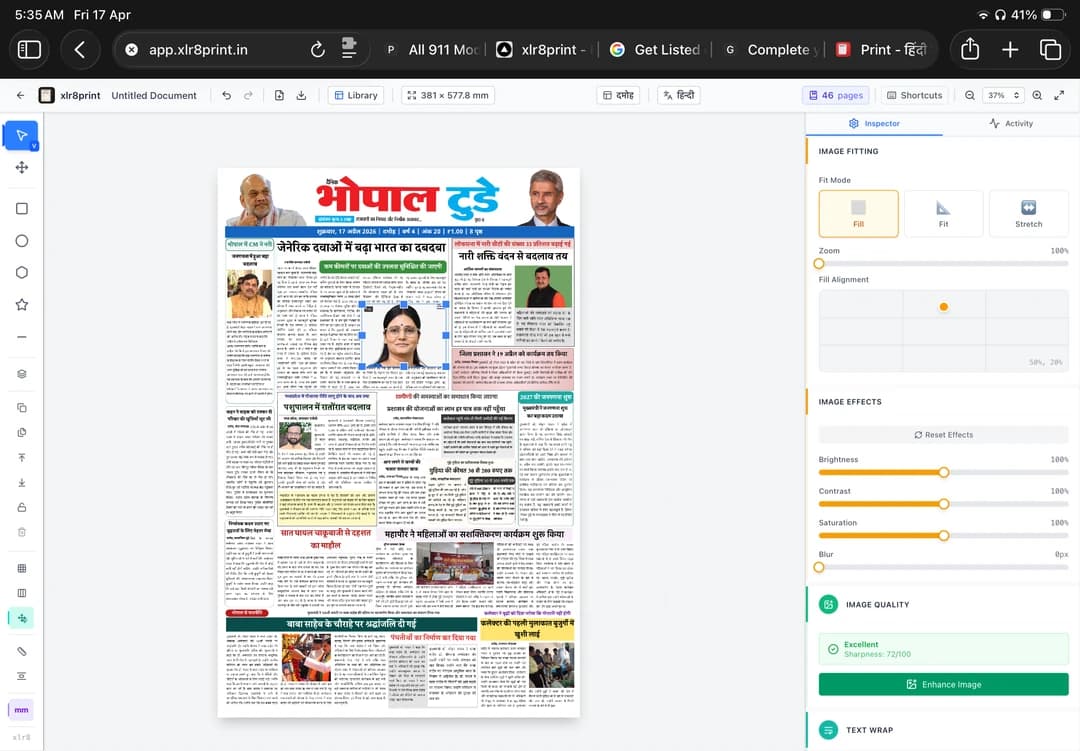
Our sample review separates layout, language, notice legibility, page size and unfinished imprint fields. Watch the workflow, then use the actual PDF to build your approval checklist. This is an output review, not a claimed source-to-corrected-page case study.
Try the correction shown in Part 2: a layout gap at 3:54, a taller body frame at 5:10, Choose Best & Fit at 5:26, and the saved preview at 6:06. At each step, check both the space and the meaning of the changed copy. A better fit is not the same as an approved story.
Part 1 is the fast orientation. Part 2 goes deeper into owned news, advertisements, auto-fitting, the open editor, and page management.
Start here if XLR8 is new to you: the core page-generation path and the controls you will use first.
See owned stories, ads, auto-fitting, editor control, and page management working together in a real workflow.
Walkthrough by Monika Singhaniya
Production software organizes approved stories, photographs, advertisements, and edition information into editable newspaper pages. A serious system should support reusable layouts, page correction, team proofing, and press-ready PDF export.
Not always. “Newspaper maker” is also used for novelty front-page and classroom-template tools. Production software should create editable pages, support recurring layouts and advertisements, provide a review workflow, and export files that can be tested against a printing specification.
Canva or Word may be sufficient for a classroom project or one-off novelty page. Use general DTP software when a skilled designer needs complete manual control. Choose newspaper-production software for recurring editions that need templates, advertisement handling, editorial review, and reliable press output.
Use your own longest headlines, difficult matras, conjunct characters, local fonts, and typical column widths. Then proof the exported PDF through the printer or RIP workflow you actually use. A feature-list claim is not a substitute for this test.
XLR8 Print is intended for recurring Hindi newspaper editions, reusable layouts, editable press pages, and small production teams. A lightweight design tool is usually simpler when the output is only a novelty front page, invitation, or social-media image.
The INR 22,999 Publisher licence covers one newspaper with up to three editions and 50 pages, then INR 25 per additional page; the INR 79,999 Agency licence covers multiple publishers and 250 shared pages, then INR 25 per additional page. Both include publication setup, onboarding, and support. Publishers should test their page size, Hindi fonts, advertisements, editorial corrections, and printer requirements before choosing a production system.